![LoLo-horizontal-2.2.png]](https://help.joinlolo.com/hs-fs/hubfs/LoLo-horizontal-2.2.png?height=50&name=LoLo-horizontal-2.2.png)
Log in to your vendor dashboard at www.joinlolo.com. If you haven't logged in before, check your email for an invitation from info@lolo.gifts with a link to create your account.
After you log in, you'll see Your Vendor Locations. Select View on your business to open its dashboard.
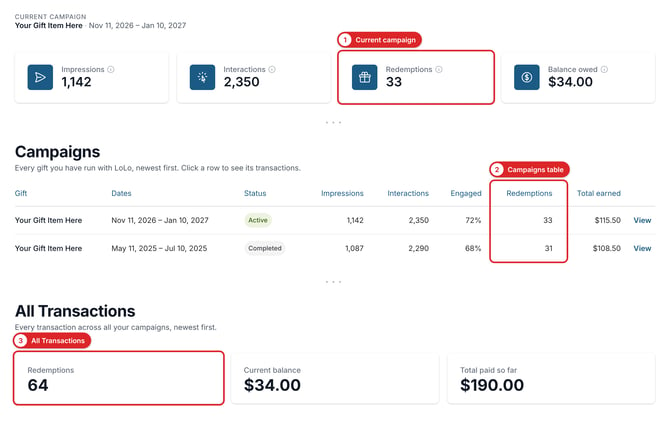
Your dashboard shows your redemptions in three places:
- Current campaign: While a gift is running, the Redemptions number at the top of the page counts gifts redeemed for that campaign.
- Campaigns table: Every gift you've run with LoLo, with its redemptions.
- All Transactions: Your total redemptions across all campaigns, your current balance, and a record of every transaction on your account.
To learn what each number means, see [Link: What do the numbers on my vendor dashboard mean?]. To learn how to read your transactions and balance, see [Link: How do I read my transactions and balance?].
If you have trouble logging in, contact your Local Account Manager or support@joinlolo.com.